
XEVKZO Dual Monitor Arms
The XEVKZO Dual Monitor Arms are worth considering if you need two independently adjustable screens and your monitors fit the listed limits: 17–34 inches and 4.4–22 pounds each.
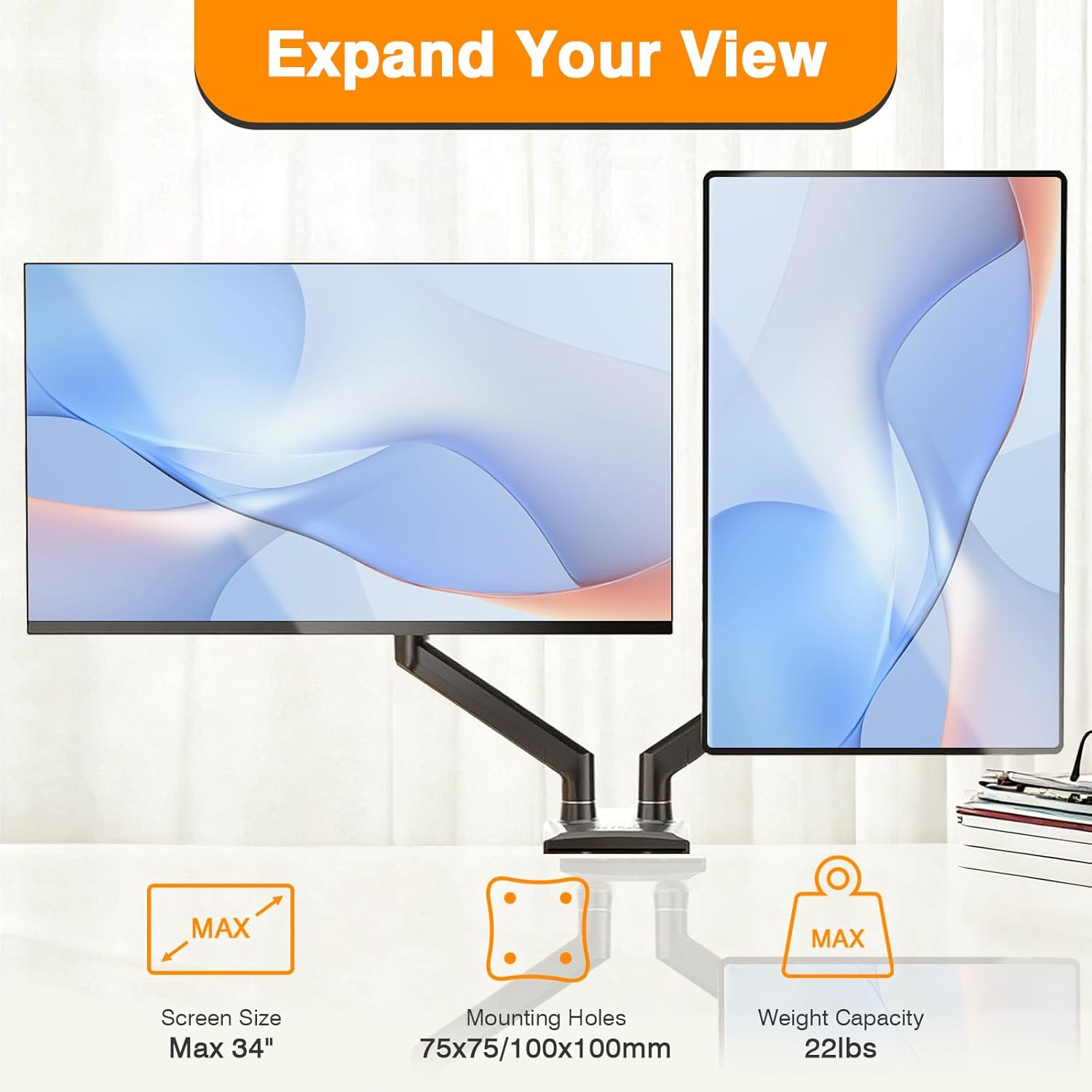
- The listing specifies support for two 17–34-inch flat or curved screens weighing 4.4–22 pounds each, with 75x75mm or 100x100mm VESA patterns.
- Each arm is listed with +70°/−45° tilt, ±180° swivel, and 360° rotation.
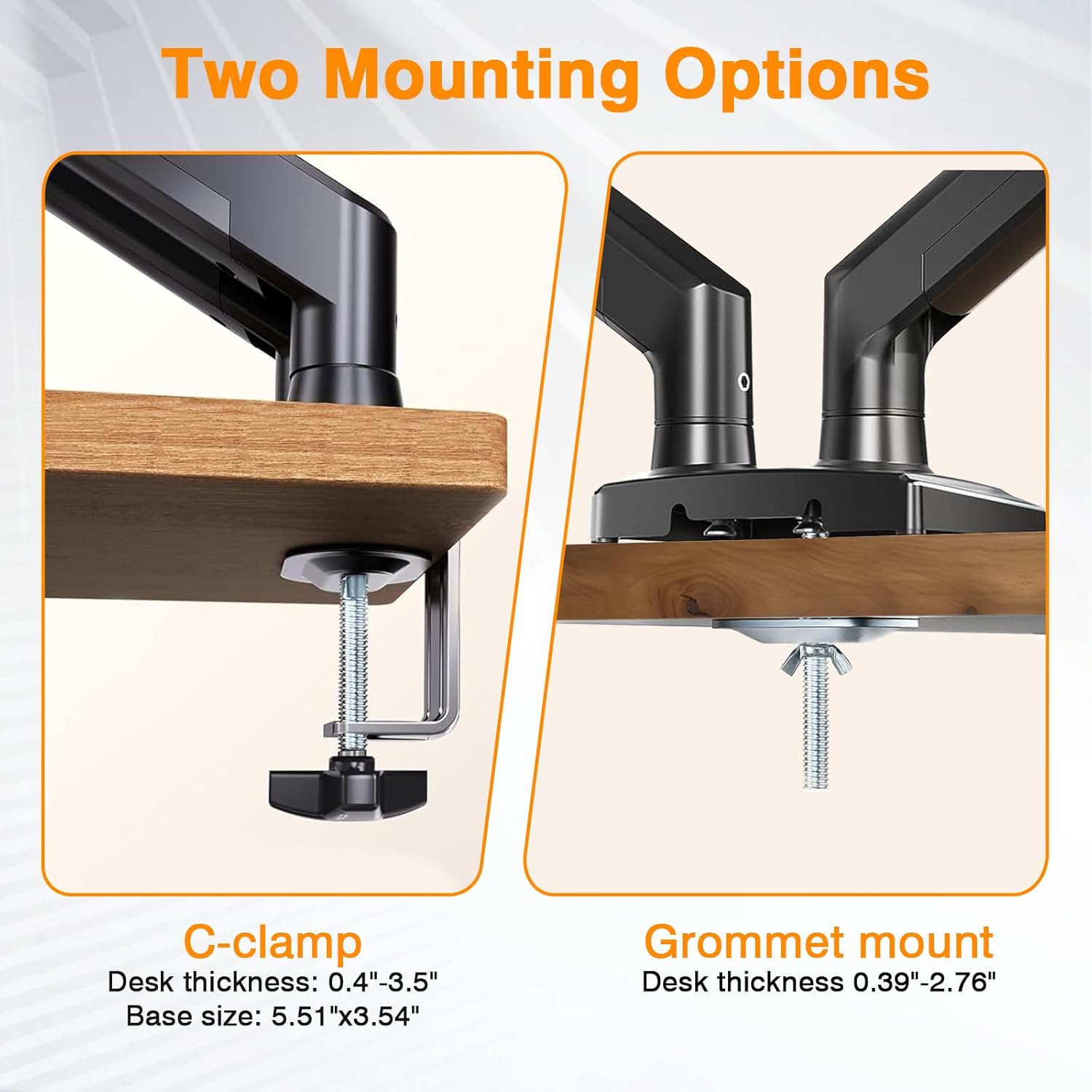
- Clamp mounting is listed for desks 0.39–2.76 inches thick; grommet mounting has the same desk-thickness range and requires a 0.39–2.36-inch hole.
- The listing claims height adjustment up to 17.3 inches and a 20.6-inch extension range.
Details from the Amazon product listing, checked November 7, 2026.
Quick verdict
Consider the XEVKZO Dual Monitor Arms if both screens meet the listed size, weight, and VESA limits, and your desk fits one of the stated mounting options. Skip treating the stability, ergonomic, and setup claims as proven results: the available information provides no independent testing.
Before you buy
- Check both monitors’ size, weight, and VESA pattern against the listing before buying.
- Measure desk thickness and grommet-hole diameter, and independently assess whether your desk is suitable.
- Allow for the arm extending past the desk edge when checking clearance.
- Treat the listing’s stability, setup-time, and ergonomic statements as claims rather than independently verified results.
What we like
- The listing supports two screens within stated size, weight, and VESA limits.
- Each arm is listed with independent tilt, swivel, and rotation adjustment.
- The listing includes clamp and grommet mounting options and says hardware and tools are included.
- Built-in cable management is listed.
Worth checking
- The arm extends past the desk edge, according to the listing.
- The listing doesn’t specify suitable desk materials or assess desk strength.
- The stability and 10-minute setup claims aren’t independently verified in the available information.
- The available sources provide no glare-specific guidance or desk-damage and screen-collision test results.
What are Dual Monitor Arms, and how do they differ from using the monitors’ included stands?
A dual monitor arm holds two screens on independently adjustable arms, according to the XEVKZO listing; that describes its intended function, not a result we tested. The listing says each arm can be adjusted separately, with tilt, swivel, and rotation. Dual Monitor Arms can therefore be positioned screen by screen as the listing describes, but no hands-on assessment is available to confirm how easily this model moves under load.
The listing claims floating monitors can free up 80% of desk space, but provides no measurement or independent verification for that figure. Dual Monitor Arms are not compared with the monitors’ included stands in the available product information, so there’s no supported basis for claiming a specific space, stability, or ergonomic advantage over those stands. If you’re weighing the options, treat the stated purpose and space-saving figure as listing claims, then check whether the mounting method and adjustment range suit your setup. Dual Monitor Arms may fit your needs, but the listing alone doesn’t establish how the product compares in practice.
How can you check whether a dual monitor arm is compatible with your monitors’ VESA mounts, screen sizes, and weights?
Check each monitor’s screen size, weight, and VESA mounting pattern against the XEVKZO listing before choosing these Dual Monitor Arms. The stated range is 17–34 inches and 4.4–22 pounds per screen, with 75x75mm or 100x100mm VESA patterns. Confirm both screens individually: a pair doesn’t meet the stated compatibility limits if either screen is outside one of those ranges.
The listing says the arms support flat and curved screens, but compatibility beyond the listed size, weight, or VESA limits is unknown. Dual Monitor Arms are described as compatible with “most” screens within the stated range, which isn’t a guarantee for every monitor. The listing information provided here contains no buyer-review record or independent compatibility testing, so there’s no review evidence to confirm how specific monitor models fit. Dual Monitor Arms may be a match when your monitor specifications line up, but verify the VESA pattern and weight using your monitor’s own documentation. If a specification is unavailable, don’t assume compatibility.
What desk thickness and material are needed to safely mount a dual monitor arm with a clamp or grommet?
The XEVKZO Dual Monitor Arms listing says the clamp fits desks 0.39–2.76 inches thick (10–70mm). For the grommet option, it gives the same desk-thickness range and specifies a mounting hole 0.39–2.36 inches (10–60mm) in diameter. Measure the desk and, if you plan to use the grommet, the hole before selecting a mounting method.
The listing doesn’t state a required desk material or assess the strength of any particular desk surface. That leaves an important suitability question open: matching the thickness alone doesn’t establish that your desk can safely carry the mounted setup. Dual Monitor Arms should be installed only after you’ve checked the surface and mounting area for suitability; the available information can’t confirm that every desk material or construction is appropriate. The listing also warns that the back of the arm extends past the desk edge, so check the space behind the mounting point as well. Dual Monitor Arms offer two listed mounting options, but neither specification replaces checking your own desk.

What are the differences between gas-spring and pole-style dual monitor arms?
The XEVKZO Dual Monitor Arms are described as gas-spring arms, and the listing says their gas springs have been cycle-tested for more than 20,000 cycles. That is a listing claim, not independent durability testing or proof of long-term performance in your setup. The listing also describes reinforced aluminum-alloy arms, but provides no separate test results for those materials.
For this model, the listed movement includes tilt, swivel, and rotation, with independent adjustment of each arm. The listing also gives a height-adjustment limit and extension range. Dual Monitor Arms in a pole-style design aren’t identified as an alternative in the information available here. That means a direct comparison of pole-style and gas-spring movement, installation, durability, or price isn’t possible from these sources. Dual Monitor Arms buyers should treat the gas-spring and cycle-test details as specifications the listing reports, not as a demonstrated advantage over an unnamed design. The listing doesn’t establish how this model performs against pole-style products.
 Play video: Product video
How do you install and adjust a dual monitor arm for two screens?
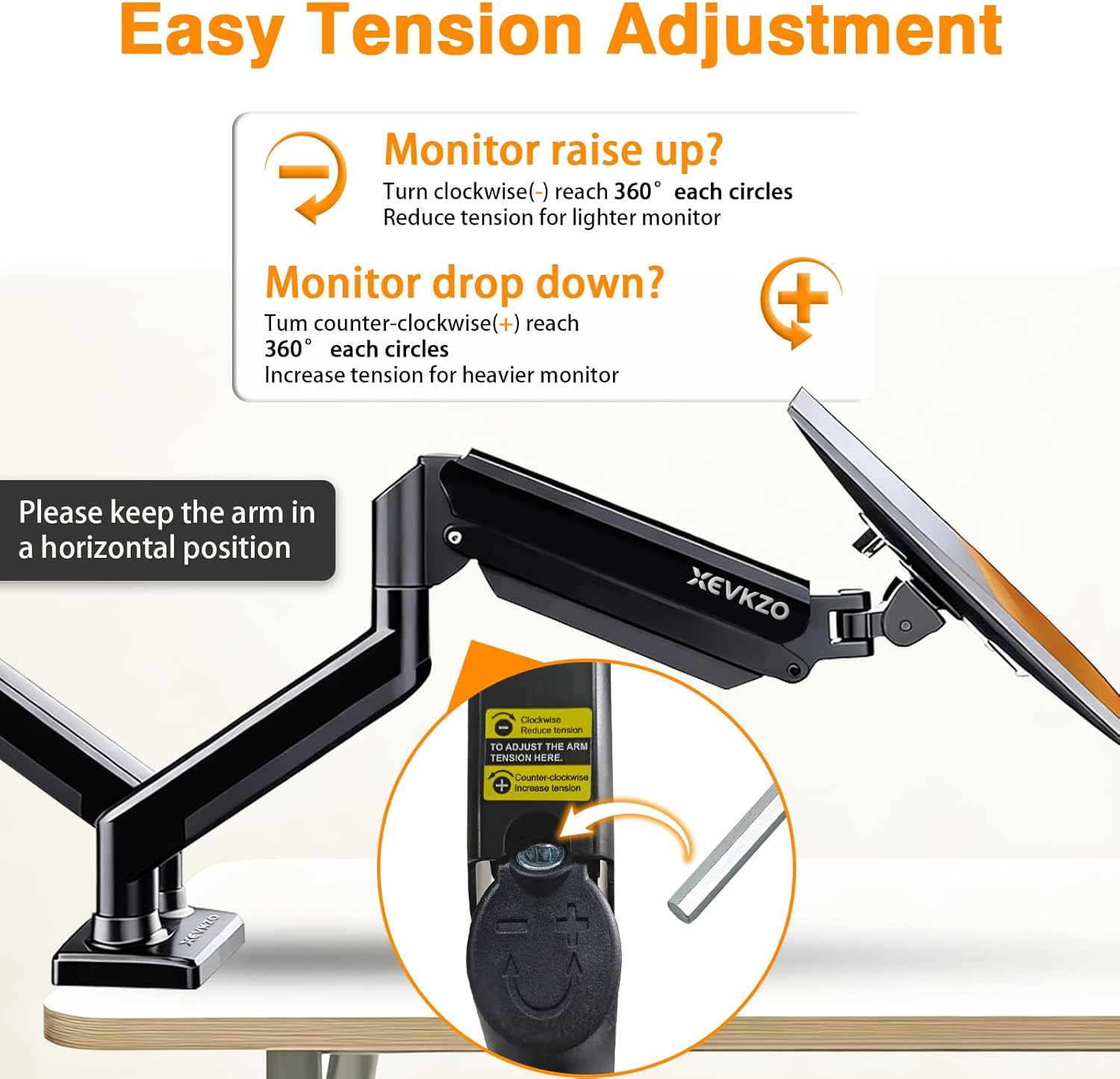
The listing offers clamp and grommet mounting for these Dual Monitor Arms. The clamp is specified for desks 0.39–2.76 inches thick; the grommet option is listed for desks in that thickness range with holes 0.39–2.36 inches in diameter. Choose only after checking your desk against the relevant limits. The listing says hardware and tools are included and claims a 10-minute setup, but that setup time hasn’t been independently verified.
Each arm is listed with +70°/−45° tilt, ±180° swivel, and 360° rotation. The listing also specifies height adjustment up to 17.3 inches and a 20.6-inch extension range. Dual Monitor Arms can be adjusted independently according to the product details, but the sources don’t provide a tested installation walkthrough or confirm how long assembly takes for a particular desk. Before mounting, check your desk fit and account for the warning that the arm extends past the desk edge. Dual Monitor Arms offer listed movement ranges; the listing doesn’t show the results of an actual installation.
How much do dual monitor arms typically cost, and which specifications account for price differences?
The available information doesn’t give a market-wide typical price or prices for competing models, so it can’t support a broader comparison or show whether this listing is inexpensive relative to alternatives.
The product details specify capacity for two screens within stated size, weight, and VESA limits. They also list gas-spring adjustment, clamp and grommet mounting options, and built-in cable management. Those are useful features to compare when assessing whether a product fits your needs, but the available sources don’t show that any of them account for price differences. Dual Monitor Arms shoppers can use the listed price and specifications as a starting point, not as evidence of value against unlisted alternatives. Dual Monitor Arms here refers to this specific product.
What stability, desk-damage, or screen-collision problems can occur with dual monitor arms?
The listing warns that the back of the XEVKZO Dual Monitor Arms extends past the desk edge, so check the clearance behind your desk before mounting. It describes reinforced aluminum-alloy arms and gas springs as providing stability without wobble or sag, but no independent test results are supplied to verify that claim. The same listing reports more than 20,000 cycle-tested gas-spring cycles; that figure doesn’t prove long-term durability in your particular setup.
The available information doesn’t provide desk-damage or screen-collision test results. Those aren’t established failures, but they are sensible installation checks: confirm that the desk and mounting area are suitable, and consider whether the screens and arm have clearance to move in your intended arrangement. Dual Monitor Arms can be adjusted in several directions according to the listing, but it doesn’t document collision testing. Dual Monitor Arms should not be assumed to prevent damage or contact between screens based on the supplied specifications alone; the sources don’t establish either outcome.
How should you position two monitors on an arm to reduce glare and neck strain?
The listing says the XEVKZO Dual Monitor Arms raise screens to eye level and are intended to improve posture and relieve neck and shoulder strain; those are product claims, not verified outcomes. The available information offers no glare-specific positioning guidance, so it can’t support a particular screen angle or arrangement as a way to reduce glare.
The listed adjustment range gives you options to position the screens: each arm can tilt +70°/−45°, swivel ±180°, and rotate 360°. The listing also specifies height adjustment up to 17.3 inches and an extension range of 20.6 inches. Dual Monitor Arms can thus be moved within those stated ranges, but the sources don’t establish which position will suit your desk, reduce glare, or relieve strain. Check your intended screen arrangement and available space rather than treating the ergonomic language as a measured result. Dual Monitor Arms are listed as independently adjustable; no glare tests or posture measurements are provided.

Frequently asked questions
Will these arms fit my monitors?
The listing specifies 17–34-inch flat or curved screens weighing 4.4–22 pounds each, with 75x75mm or 100x100mm VESA patterns. Compatibility outside those limits is unknown.
Can I use the clamp or grommet mount on my desk?
The clamp is listed for desks 0.39–2.76 inches thick. The grommet option is listed for desks in that thickness range with 0.39–2.36-inch holes. Desk material and strength requirements aren’t provided.
How much adjustment does each arm provide?
The listing gives each arm +70°/−45° tilt, ±180° swivel, and 360° rotation, plus height adjustment up to 17.3 inches and a 20.6-inch extension range.
Is the 10-minute setup claim verified?
No independent verification is provided here. The listing says hardware and tools are included and claims a 10-minute setup.
Ready to take a look?
Check the current price, options and delivery for the XEVKZO Dual Monitor Arms.


